Frequently Asked Questions
Everything you need to know about 3D printing, STL files, OreKo models, filaments, and getting the best results from your printer.

Everything you need to know about 3D printing, STL files, OreKo models, filaments, and getting the best results from your printer.
FDM stands for Fused Deposition Modeling. It is the most common type of consumer 3D printing. The printer melts a plastic filament and deposits it layer by layer on a build plate, building up the object from the bottom up. FDM printers like the Bambu Lab A1, Creality Ender 3, and Prusa MK4 use this method. It is the right choice for most hobbyist, cosplay, and functional print applications.
FDM printers melt plastic filament and build objects layer by layer. Resin printers (MSLA/SLA) use UV light to cure liquid resin into solid form. FDM is cheaper to run, more beginner-friendly, and handles larger prints. Resin produces finer surface detail and is better suited to jewelry and highly detailed miniature figures. Most OreKo models are designed and tested on FDM printers. See our FDM vs Resin guide for a full comparison.
No. Most hobbyist printers simply download ready-made STL files and slice them for printing. Design skills only matter if you want to create original models from scratch. OreKo models on Cults3D are fully designed, sliced, tested, and documented — you download the file, open it in your slicer, and print. No design knowledge required.
Print time depends on the size of the object, the layer height, and the speed settings on your printer. Small pieces like mana chips or miniature window components take 30-60 minutes. A full deck box typically takes 2-4 hours. Large functional prints like the XL Mold Box walls take around 4 hours for a batch of five. Bambu Lab printers at fast mode reduce these times significantly compared to older printers.
Supports are temporary printed structures that hold up overhanging sections of a model during printing. They are removed after printing and often leave marks on the surface. A no-supports design means the STL file has been oriented and engineered so that no overhangs require support material. Every OreKo model is tested for support-free printing in the orientations provided. See our full guide: What Does No Supports Needed Actually Mean?
Infill is the internal structure printed inside a solid-looking model. 0% infill is hollow. 100% infill is completely solid. Most prints work well at 10-25% infill for functional parts. Small detail pieces like mana chips and miniature window components benefit from 100% infill because they are small enough that solid fill adds only minutes to print time while making the piece substantially stronger. See our Complete Infill Guide for a detailed breakdown.
PLA (Polylactic Acid) is the most widely used FDM filament. It is plant-based, easy to print, available in hundreds of colors, and works on virtually every FDM printer. Use PLA for deck boxes, dollhouse miniatures, cosplay props, and any model that will not be exposed to high heat or significant mechanical stress. All OreKo models are designed and tested with standard PLA at 0.4mm nozzle diameter. See our PLA vs PETG guide.
PLA is easier to print, produces crisper surface detail, and is available in more colors including specialty finishes. PETG is more flexible, more impact-resistant, and handles higher temperatures (up to ~80°C vs PLA’s ~60°C). PETG is better for parts that will be handled roughly, exposed to heat, or need to flex slightly. PLA is better for display pieces, miniatures, and anything where surface quality matters most. For the multi-material PLA/PETG pin trick on the Lollipop Chainsaw chain links, see the model page for details.
Silk PLA has a semi-gloss, metallic-like sheen that produces a polished surface finish straight off the printer. It looks excellent on display pieces like the Dollhouse Balcony Railing Set where the light-reflecting surface mimics stone or cast iron. Avoid silk PLA for cosplay props you plan to paint — the smooth surface does not bond well to primer or acrylic paint. Use matte PLA instead for anything that will be painted.
Matte PLA has a microscopically rougher surface than standard or silk PLA. That surface texture gives primer and acrylic paint a mechanical bond to grip onto, making paint adhere far more reliably. For cosplay props like the Lollipop Chainsaw chain links that will be painted to look like metal, matte black PLA is the recommended starting filament. Standard PLA requires more sanding before paint will stick. See our full guide: Why Matte Filament Is Best for Cosplay Prints You Plan to Paint.
Yes. Filaments containing carbon fiber, glass fiber, glow-in-the-dark particles, metal fill, or wood fill are abrasive. Running them through a brass nozzle will erode the inside of the nozzle, widening it over time and degrading dimensional accuracy. Switch to a hardened steel nozzle before printing any abrasive filament. A hardened steel nozzle costs $10-25 and lasts far longer than a brass nozzle under abrasive use. Standard PLA, PETG, and ABS are safe in brass nozzles. See our full breakdown: 3D Printer Nozzle Sizes Explained.
Standard white or cream PLA at 0.12mm layer height gives excellent detail for most dollhouse pieces. For a premium finish on display pieces like the Dollhouse Balcony Railing Set, silk marble white PLA produces a surface that genuinely resembles stone or cast iron at viewing distance. The silk sheen creates micro-shadows in the balustrade geometry that make the piece look dimensional and realistic. Matte PLA works well for pieces you plan to paint afterward.
Layer height controls the thickness of each printed slice. 0.20mm is standard for functional parts and large models — fast and reliable. 0.12mm is recommended for anything with fine detail like miniature windows, logo caps, and balustrade posts. 0.08mm is the finest practical layer height for logo artwork on deck box caps and small detail pieces. A general rule: use 0.20mm for box bodies, 0.12mm for most detail pieces, and 0.08mm where surface quality is the priority. See our detailed breakdown: 3D Printing Layer Height Explained.
The standard 0.4mm brass nozzle handles every OreKo model perfectly. All print settings documented on OreKo product pages assume a 0.4mm nozzle. A 0.2mm nozzle produces finer detail but doubles print time and clogs more easily. A 0.6mm or 0.8mm nozzle prints faster but loses fine detail on logo caps and miniature components. Stick with 0.4mm unless you have a specific reason to change. See our full guide: 3D Printer Nozzle Sizes Explained.
Wall lines (also called perimeters or loops) determine the thickness of the outer shell of a print. 2 wall lines is standard for most prints. 6 wall lines is the strong setting for parts that will be handled regularly or carry structural load — like the body of a Commander deck box or the walls of the mold box. Use 2 walls for display pieces and detail parts, 6 walls for anything that needs to be durable under regular handling.
The first layer height is the thickness of the very first layer the printer deposits on the build plate. It is usually set slightly thicker than subsequent layers (0.16mm-0.20mm) to improve bed adhesion — a thicker first layer squishes into the bed surface and grips better. This is set separately from your main layer height in most slicers. OreKo model pages document the recommended first layer height alongside all other settings.
Basic calibration significantly improves results. The two most important checks are bed leveling (or auto-calibration on printers like Bambu Lab) and first layer height. A poorly calibrated first layer causes prints to fail or warp at the base. On Bambu Lab printers with automatic calibration, you can generally trust the factory defaults. On printers like the Ender 3, manual bed leveling before each session produces more reliable first layers.
An STL file (Standard Tessellation Language) is the most common file format for 3D printing. It defines the surface geometry of a 3D model as a mesh of triangles. You download an STL file, import it into a slicing program (like Bambu Studio, PrusaSlicer, or Cura), and the slicer generates the toolpath instructions your printer follows. STL files do not contain color or material information — just the shape. See our full guide: What Are STL Files?
3MF (3D Manufacturing Format) is a newer file format that stores additional information alongside the geometry: color assignments, multi-material plate setups, print settings, and component organization. OreKo includes Bambu Studio 3MF files with most models — these files open in Bambu Studio with all the filament color assignments, print settings, and build plate layouts already configured. If you have a Bambu Lab printer with AMS, the 3MF file handles multi-color setup automatically.
A tested STL file will show actual photographs of printed results (not just renders), document specific print settings, and have an update history based on real-world feedback. Listings with only 3D renders and no printed photos have often never been physically printed. OreKo files are all photographed after printing, settings are documented precisely, and several models have been updated based on buyer feedback. See our full breakdown: Not All 3D Printable Files Are Created Equal.
All OreKo STL and 3MF files are available for purchase on Cults3D at cults3d.com/en/users/OreKo/3d-models. Detailed product information, print settings, and photos for each model are on this site at orefly.com/3d-models.
Yes. All OreKo STL files can be scaled in your slicer. Scale uniformly to maintain correct proportions. For dollhouse models: scale to 50% to go from 1:6 to approximately 1:12 scale. For the Miniature Window with Planter, there is a dedicated 1:12 version included in the download — no scaling needed. Be aware that scaling down very small increases the risk of fine details printing poorly; use 0.08mm or 0.12mm layer height when printing at reduced scale.
OreKo STL files are licensed for personal use. Commercial use — selling printed copies for profit — is not permitted under the standard Cults3D license unless a commercial license is specifically offered. Check the license terms on each listing page on Cults3D before using any file commercially. Contact us via the Contact page if you have questions about licensing.
OreKo is a small family-run maker business based in South Florida. Every model in the catalog has been designed, physically printed, and tested before publishing. The print settings documented on each product page come from real-world testing on Bambu Lab and Creality printers, not generic recommendations.
Yes — every single one. The photos on each Cults3D listing and on this website are photographs of real printed results, not renders. Settings like layer height, infill, and wall count are the exact values used during testing. Several models have been updated after buyer feedback: the Lollipop Chainsaw links added rotating chain versions, the Miniature Window with Planter added 1:12 scale, thicker wall, and wider planter variants, and the Dollhouse Balcony added a double-bevel top and short version.
OreKo models are primarily designed and tested on the Bambu Lab X1C and A1. Several models including the XL Mold Box and Dollhouse Balcony Railing have also been tested on the Creality Ender 3 V2 Neo. All STL files are compatible with any FDM printer — Bambu 3MF files are pre-configured for Bambu Lab hardware but the STL versions work on Prusa, Creality, or any standard FDM machine.
The best way to reach us is through the Contact page on this website. You can also message directly on Cults3D via the model listing page. We respond to all questions and have updated models based on buyer feedback — if something is not printing correctly, reach out and we will help troubleshoot.
In 1:12 scale, one unit of the model equals 12 of the same units in real life. A real door that is 80cm wide becomes approximately 6.7cm in 1:12. This is the most common standard dollhouse scale worldwide. The OreKo Refrigerator Side-by-Side model and the dedicated 1:12 version of the Miniature Window with Planter are designed for this scale. See our full explanation: 1:12 Scale Explained.
In 1:6 scale, one unit equals six real-world units — twice the size of 1:12. This scale is used for larger collector dolls and fashion doll houses. The OreKo Miniature Windows with Working Shutters Set is designed for 1:6 scale. It can be scaled to 50% in your slicer for approximate 1:12 size, though 0.08mm layer height is recommended at that smaller scale for clean detail.
The shutters pivot on hinge pins made from standard 1.75mm filament — the same filament already on your spool. Cut a piece to the hinge barrel length, align the shutter in the frame slot, and push the pin through. The holes are sized to 1.75mm so the pin holds with a light interference fit. No glue required. The shutters open and close smoothly. Printing at 0.12mm layer height gives the hinge holes the dimensional accuracy needed for clean operation. See the Miniature Windows product page for the full assembly walkthrough.
For best results on dollhouse and miniature prints, use 0.12mm layer height for most components and 0.08mm for the finest detail pieces. At 0.20mm, fine architectural details like window molding, balustrade posts, and shutter slats lose definition. At 0.12mm those same details come out sharp and clean. The extra print time is measured in minutes on small pieces and is worth the quality improvement. See our full guide: Best Layer Height for 3D Printing Miniatures.
Yes. 3D printed PLA takes acrylic paint well, especially with primer. For best paint adhesion, spray two to three light coats of filler primer before applying color. Matte PLA bonds to primer more readily than silk PLA. For the Dollhouse Balcony Railing, many builders prefer to leave it unpainted in silk marble white PLA — the sheen mimics stone naturally. For pieces that will be painted, print in matte white or matte grey for the best color accuracy.
Single-sleeved cards use one sleeve per card, typically 65 x 90mm. Double-sleeved cards use two sleeves — an inner sleeve and an outer sleeve — resulting in an approximately 68 x 93mm card size. A single-sleeve deck box is too small for double-sleeved cards. Choose the version that matches your sleeving setup. OreKo offers both: the MTG Eldrazi Incursion Standard deck box fits single-sleeved cards, and the Dual Sleeve large version fits double-sleeved Commander decks. See our sleeve sizing guide.
Single-sleeved cards use one sleeve per card, typically 65 x 90mm. Double-sleeved cards use two sleeves — an inner sleeve and an outer sleeve — resulting in an approximately 68 x 93mm card size. A single-sleeve deck box is too small for double-sleeved cards. Choose the version that matches your sleeving setup. OreKo offers both: the MTG Eldrazi Incursion Standard deck box fits single-sleeved cards, and the Dual Sleeve large version fits double-sleeved Commander decks. See our sleeve sizing guide.
Standard PLA is the most practical filament for deck boxes. It is rigid, available in hundreds of colors, prints cleanly at standard settings, and produces the crisp logo cap detail that makes a themed deck box look finished. For the logo cap specifically, matte PLA gives slightly better visual definition at fine layer heights. Silk PLA works on the box body for a polished look. Avoid TPU for deck boxes — it is too flexible to hold card weight reliably. See our full guide: Best Filament for a 3D Printed Deck Box.
Yes — this is exactly how OreKo deck box files are designed. The cap and box body are separate STL files specifically so you can print each in a different color. Print the body in black and the Jolly Roger cap in white. Print the Eldrazi cap in purple and the box body in dark grey. On Bambu printers with AMS, the included 3MF file handles multi-color assignment automatically — just assign your filament colors and slice.
The OreKo One Piece Jolly Roger and Gear 5 Deck Box is designed for single-sleeved standard cards at approximately 65 x 90mm. For double-sleeved One Piece Card Game decks, the Deck Maker Set is the larger format option.
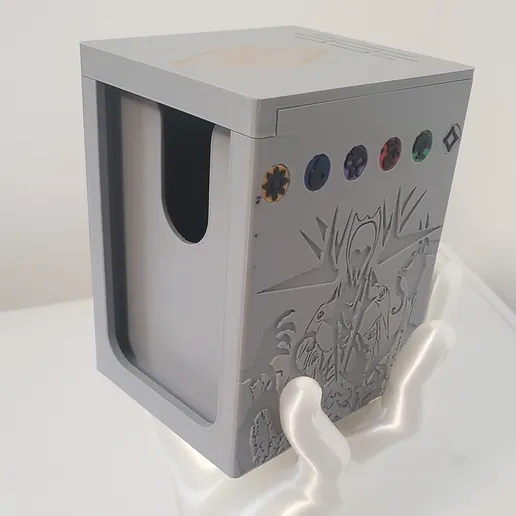
The MTG Modern Horizons 3 Eldrazi Incursion deck boxes come in two sizes. The Standard Size is for single-sleeved cards — standard 60-card MTG decks with one sleeve layer. The Dual Sleeve Large version is sized for double-sleeved Commander decks at 100 cards. Both include the 5-color WUBRG mana chips printed separately for color accuracy.
The five MTG mana chips represent the five colors of Magic — White (W), Blue (U), Black (B), Red (R), and Green (G) — matching the Eldrazi Incursion Commander deck’s 5-color WUBRG identity. Each chip is a separate STL file so you can print them individually in the correct color without needing a multi-color printer. Print at 0.08mm layer height and 100% infill for the sharpest symbol geometry. On a Bambu printer with AMS, the 3MF file handles all five colors in a single print job.
The Bambu Lab A1 Mini is the best beginner FDM printer available today. It has automatic bed leveling and calibration, an intuitive slicer (Bambu Studio), fast print speeds, and optional AMS Lite for multi-color printing. It produces excellent results on all OreKo models straight out of the box with minimal setup. For a detailed breakdown, see our Bambu Lab A1 Mini Review.
Yes. OreKo models with included 3MF files are specifically pre-configured for Bambu Lab printers — the X1C, A1, and A1 Mini. Open the 3MF file in Bambu Studio and filament color assignments, print settings, and plate layouts are already set up. Just swap in your filament choices and slice. All STL files also work on any other FDM printer using standard slicer settings.
Yes. All OreKo STL files print on any standard FDM printer including Creality Ender 3, Prusa MK4, Prusa MINI+, and any other machine. The Bambu Studio 3MF files are Bambu-specific, but the STL files import into PrusaSlicer, Cura, or Bambu Studio without issue. Use the print settings documented on each model page — they apply regardless of which printer you are using.
AMS stands for Automatic Material System — Bambu Lab’s multi-filament loader that holds up to four filament spools and switches between them automatically during a print. You do not need an AMS for any OreKo model. Every model includes separate STL files for each component so you can print pieces individually in different filament colors on a single-color printer. The AMS simply makes multi-color printing faster and automated on Bambu hardware.
Most OreKo models fit on a 200 x 200mm bed or smaller. The XL Mold Box 240mm version requires a 256 x 256mm bed (Bambu Lab A1, X1C, P1S). The Lollipop Chainsaw long link version requires a 220 x 220 x 250mm bed. The flat individual link version of the chain and all dollhouse and card game models fit on any standard print bed.
Matte PLA is the best starting filament for any cosplay prop you plan to paint. Its microscopically rough surface bonds to primer and acrylic paint without requiring heavy sanding. Standard PLA also works with proper surface prep. Avoid silk PLA for painted props — the smooth surface repels primer. For metallic-looking chain links like the Lollipop Chainsaw chain, matte black PLA gives the most convincing base for metallic dry-brush finishing. See our full painting guide: Why Matte Filament Is Best for Cosplay Prints.
The most reliable method for a metallic prop finish is the matte base plus dry-brush technique. Print in matte black PLA, apply two to three coats of grey filler primer, then dry-brush Rub n Buff or metallic acrylic paint over the raised surfaces. The matte black base remains visible in the recesses, creating natural shadow depth. The metallic highlights on raised surfaces read as real metal at convention viewing distance. Seal with matte varnish to protect the finish.
Yes. The Chainsaw-Links-Flat-Perfect-fit and the 487 file versions are designed specifically for an articulated rotating chain. The Perfect Fit version uses precision joint tolerances so links snap together and hold position while still allowing rotation. Print at 0.12mm layer height and 100% infill using a lines pattern for the dimensional accuracy the joints need. The final version includes a small groove limiting how far the top clip travels, creating a controlled articulation range. See the Lollipop Chainsaw Chain Links page for the full file breakdown.
Use the Long Link version for the straight flat sides of the chainsaw bar — the two long runs where the chain does not need to bend. This requires a 220 x 220 x 250mm or larger print bed. Use the flat individual link version for the curved tip section and any area that needs to wrap around a curve. The flat version prints on any printer regardless of bed size and is designed to flex into curves without snapping.

If you did not find your answer above, reach out directly. OreKo is a small family operation and we read and respond to every message personally.
For file-specific questions, you can also message on Cults3D directly via the listing page of the model you purchased.
We also cover many of these topics in depth in the OreKo blog:
Every OreKo model has been designed, printed, and tested. No guesswork. No renders-only listings. Real results from real printers.