
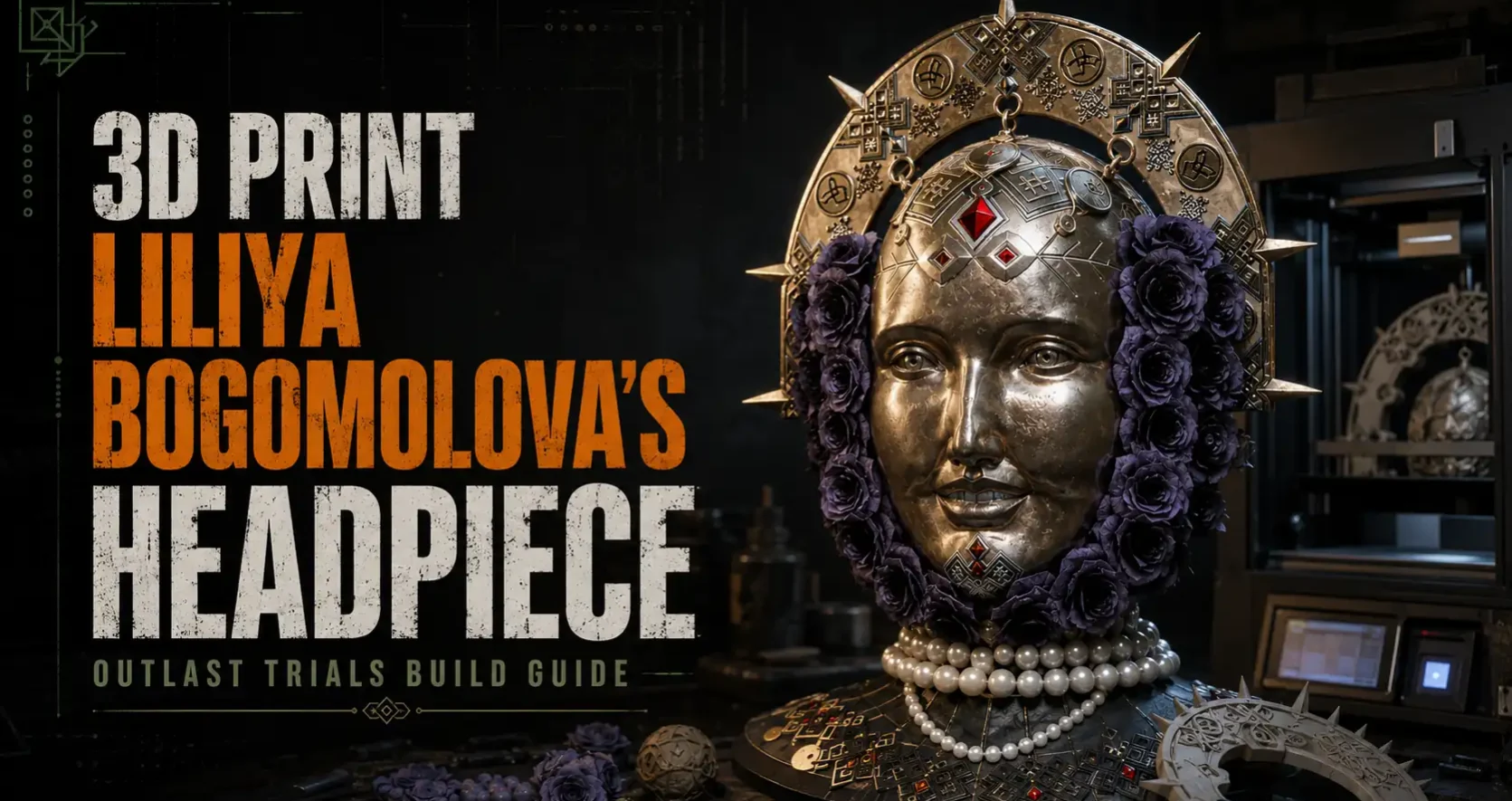
Sister Liliya Bogomolova from The Outlast Trials Season 5 is one of the most technically ambitious cosplay subjects to come out of horror gaming in years. Concept artist Hugo Richard and 3D character artist Ziyang Tan built her design around a single terrifying game mechanic: she has a fully realized face on both sides of her head, so you can never tell which direction she’s actually looking. That rear mask is not a prop or a decoration. It is the central design statement of the entire costume, and it’s the piece this guide is built around.
Her headpiece has four major components that all work together: the spiked arch crown inspired by Russian Orthodox icon halos and the kokoshnik headdress tradition, the rear skull face mask with its elaborate diamond tile pattern and exposed tooth grin, the front forehead ornaments suspended on twisted wire, and the circular eye lens mounted on the side. Each one is 3D printable with standard FDM hardware. This guide takes you from reference to printed, finished, and assembled.
Understanding the Design Before You Model Anything
Liliya’s headpiece is rooted in real historical and cultural sources, and understanding those sources is what separates a build that captures the character from one that just approximates the shape.
The Arch Crown: Kokoshnik + Byzantine Icon Halo
The arch crown draws from two traditions simultaneously. The Russian and Ukrainian kokoshnik is a tall, arch-shaped headdress worn by women, traditionally embroidered with folk patterns, worn as part of ceremonial dress from the 10th century onward. Liliya’s design overlays this with the nimbus halo seen in Eastern Orthodox religious icons, where saints are shown with a flat golden arch rising behind the head. The spikes radiating from the arch echo the radiant crown of thorns and the sunburst halo common in both Byzantine and Roman Catholic iconography. Hugo Richard combined these into a single object for a character who considers herself a messianic figure, the “Angel of Leningrad.”
The geometric folk-art pattern covering the face of the arch is based on Ukrainian vyshyvanka embroidery and Slavic symbolic motifs: diamond forms, cross patterns, snowflake medallions, and circular talismanic symbols. Every element of the pattern reads as both decorative and spiritually significant within her lore.
The Rear Mask: The Dual-Face Mechanic Made Physical
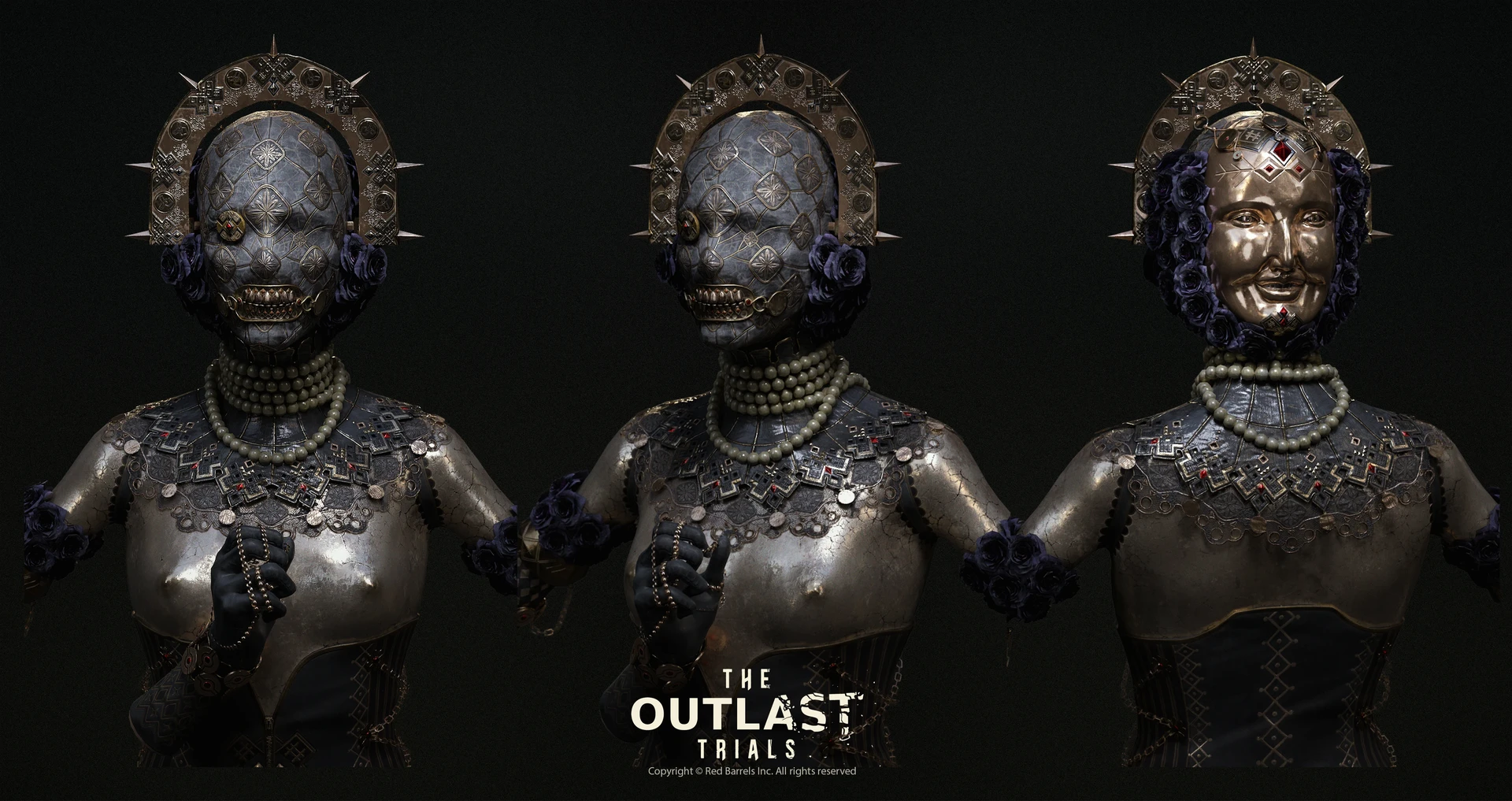
The rear mask is a full-face covering worn on the back of the head. It matches the front face’s structure almost exactly, complete with its own eye detail and a grinning mouth with exposed teeth. In gameplay, this means that other mannequins in the Resort environment look identical to Liliya from behind. The rear mask’s surface is covered in a repeating diamond tile pattern, each tile embossed with a four-petal flower or star motif and bordered by raised lines. The overall texture reads like an elaborate quilted or embossed leather surface.
The Front Ornaments: Suspended Wire Architecture
The front of the crown carries several small diamond-shaped and rectangular plaques suspended from twisted wire, dangling over the forehead. The most prominent element is a large red rhombus gem in a square setting positioned at the center of the forehead. Smaller diamond-shaped plaques with geometric symbols flank it. The wire framework is visible and intentional, part of the aesthetic rather than an engineering afterthought.
The Side Eye Lens: The Monocle Detail
On the right side of the front face, a circular convex dome lens sits where an eye would be. It has a small red dot at its center and a thin wire frame around its rim. This connects via wire to the forehead ornament assembly. In the game model it reads as both a mechanical eye and a jeweler’s loupe, fitting the baroque-industrial aesthetic of the Murkoff Corporation’s experiments.
Reference Resources Before You Start
The Official 3D Game Model on Sketchfab
User dishfiscal uploaded the complete Liliya Bogomolova game model to Sketchfab as a free download. Search “Liliya Bogomolova The Outlast Trials Full Model” on sketchfab.com to find it. Download the OBJ format or FBX. This gives you the actual game geometry to measure in Blender rather than guessing from screenshots. Import it into Blender, set scene units to centimeters, and use the Measure tool to get precise dimensions for every component before you model your printable versions.
ArtStation Reference
Hugo Richard’s concept art is on his ArtStation at artstation.com/hugo-richard. His “Liliya Bogomolova” project page shows the front, three-quarter, and rear views of the headpiece in the concept illustration that OreKo used as Image 1 in the reference photos above. Save the full-resolution versions of the three-panel image. The rightmost panel, showing the rear mask isolated from the arch, is the single most useful reference image for building the back mask geometry.
Key Dimensions Extracted from Reference
Using the Sketchfab model scaled to an average female adult head (approximately 21-22cm head circumference side-to-side, 20cm front-to-back at the widest):
- Arch outer width: approximately 32-34cm
- Arch inner void (the opening that frames the head): approximately 24-26cm wide, 18-20cm tall at center
- Arch band width (flat face): approximately 4-5cm
- Arch thickness (front to back): approximately 1.5-2cm
- Spike length: approximately 7-9cm for the longest central spikes, 5-6cm for side spikes
- Rear mask width: approximately 21-23cm (spans full back of head ear to ear)
- Rear mask height: approximately 23-26cm (hairline to below chin of rear face)
- Diamond tile size on rear mask: approximately 3.5-4cm per diamond edge
- Eye lens diameter: approximately 3.5-4cm
Materials and Tools List
Printer Requirements
The arch crown is the constraining piece. Its 32-34cm outer width exceeds the 256mm build volume of a Bambu Lab A1. You have two options:
Option A (Bambu Lab A1 or any 256mm printer): Split the arch at the apex into two halves. Each half is approximately 17cm, fits comfortably on a 256mm bed. You glue them after printing with CA glue and an internal alignment pin. The seam sits at the very top of the arch where it is naturally hidden.
Option B (Bambu Lab H2S, H2D, Creality K2 Plus, or any 340mm+ printer): Print the arch in one piece. No seam, no assembly at the crown. This is the cleaner result for a display-quality build.
The rear mask is approximately 23cm wide, well within a 256mm bed if printed face-down flat. The rest of the components are small enough to print on any modern FDM machine.
Filament
- Arch crown and spikes: matte gold PLA or standard PLA for painting. eSUN Matte Gold if you want to minimize paint work. Standard grey matte PLA if you plan to paint and age the metal finish.
- Rear mask: grey matte PLA as the base (the mask surface is a dark grey-blue in the game). Dark grey or charcoal matte PLA gets close to the final color before painting.
- Eye lens: translucent natural PLA or clear PETG. The slight translucency of natural PLA with a red dot painted underneath reads exactly like the in-game lens.
- Teeth insert: standard cream or off-white PLA. Use the closest color to tooth white you have.
- Forehead ornaments: grey matte PLA for painting gold.
Hardware and Hybrid Materials
- 22-24 gauge brass or copper wire: for the visible wire frame connecting the forehead ornaments and eye lens. Craft stores sell this in small spools. The wire is intentionally visible in the design.
- Small N52 neodymium disc magnets (6mm x 2mm): for attaching the arch crown and rear mask assembly to the head covering. Allows removal without destroying the build.
- Thin wire or headband armature: the arch crown needs to sit stably on the head. A heavy-gauge millinery wire loop (the kind used in hat-making) formed to your head circumference and embedded in the crown’s inner base gives a secure attachment point.
- Red faceted resin gems (approximately 15mm diamond cut) for the forehead ornament center piece. Available on Amazon or AliExpress in craft gem packs. Glue these in rather than printing them.
- Small red flat-back rhinestones (4-6mm) for the tooth gumline accents. Use craft rhinestones, not printed details, at this scale.
- UV resin (thin viscosity): for the gem lens finish on the eye piece and the red diamond gem. Applied over the printed and painted base for a deep, glassy appearance. Bondic, ELEGOO UV resin, or any 3D pen UV resin works.
- Airbrush or spray primer: Rust-Oleum 2-in-1 Filler Primer for prep.
- Acrylic paints: gold metallic (Vallejo Model Color Gold 70.996), dark brown wash (Games Workshop Agrax Earthshade or Vallejo Sepia Wash), dark grey-blue (Vallejo Blue Grey or Citadel Mechanicus Standard Grey), cream white for teeth
- Rub-n-Buff Gold Leaf: optional but extraordinarily effective for the metallic arch finish after priming
- Matte sealant spray: Rust-Oleum Matte Clear
Part 1: The Kokoshnik Arch Crown
Approach A: Blender (Recommended for Pattern Accuracy)
This is where the Claude + Blender MCP workflow described in our Blender MCP guide pays off. The arch requires a curved surface with embossed relief pattern that you can describe parametrically to Claude and have generated quickly.
Step 1: Set up the scene. Open Blender. Set scene units to Metric > Millimeters. Set the scene scale so you’re working at real-world dimensions. This matters for fit.
Step 2: Create the arch base geometry. Add a Torus (Shift+A > Mesh > Torus). Set Major Radius to 165mm (this gives roughly the right arch width), Minor Radius to 22mm (the half-thickness of the arch band), and set Major Segments to 64 for a smooth arch. You now have a donut. You need only the top half. Enter Edit Mode (Tab), Select All (A), then Box Select (B) to select only the bottom half of the torus and delete it. You’re left with a semicircle arch in cross-section.
At this point the arch’s profile is circular in cross-section. The real arch has a flat rectangular profile. To change this: in Edit Mode, select the top face ring, then use Scale on the Z axis to flatten the circular cross-section into the flat rectangular profile seen in reference. S > Z > 0.4 gives a good starting compression. Then scale on Y (depth axis) to bring the front-to-back thickness to approximately 20mm.
Step 3: Create the arch inner void. The inner edge of the arch needs to follow a path that allows your head to sit inside. Looking at the reference, the inner void is not a perfect semicircle. It widens slightly toward the base to accommodate the head width, then the arch legs angle slightly outward. In Edit Mode, select the inner edge loop and scale it outward slightly at the bottom.
Step 4: Model the pattern surface. The folk art pattern on the arch face is the most time-consuming part. You have three approaches of increasing complexity:
Approach 4A (Displacement Map, Fastest): Find or create a seamless tileable texture based on Ukrainian vyshyvanka patterns. Search for “Ukrainian embroidery vector pattern” on free pattern sites like Vecteezy. Export the pattern as a grayscale height map image. In Blender, add a Displace Modifier to the arch with the pattern as the texture. Set the displacement strength to 0.5-1mm. This embosses the pattern into the arch surface as printable relief.
Approach 4B (Boolean Relief, More Accurate): Create flat 2D representations of individual pattern elements (diamond frames, snowflake rosettes, cross symbols) as separate mesh objects. Use Boolean Union to merge them onto the arch face surface. This gives harder-edged relief that matches the in-game model more closely but takes longer.
Approach 4C (Texture Paint + Displacement, Best Result): Unwrap the arch surface, texture paint the pattern directly onto the UV map in Blender, then convert the painted texture to a displacement modifier. This gives the most control.
For the primary pattern elements to model individually: the circular medallion with a three-leaf symbol appears at regular intervals along the arch. The cross-and-diamond interlocking pattern fills the spaces between. Snowflake/star rosettes appear near the arch top. Model these as separate mesh objects approximately 1-1.5mm raised above the arch face surface, then Boolean Union them onto the arch.
Step 5: Add the spikes. The spikes are separate objects parented to the arch. Add a Cone mesh (Shift+A > Mesh > Cone). Set the cone dimensions: bottom radius 8mm, top radius 0.5mm, depth (height) 80mm for the central largest spike. The cross-section is not circular; looking at the reference carefully, the spikes are roughly trapezoidal, like flattened diamond cross-sections. In Edit Mode, select the full spike and scale on Y to 0.5 to flatten it.
Duplicate this spike and scale it down to approximately 65mm for the flanking spikes, and 50mm for the outermost spikes. Position 7-9 spikes along the arch: 1 at the apex, 2 on each side of the apex stepping toward the legs, and 1 on each leg near the base.
The spikes in the reference have a subtle S-curve where they narrow then widen then taper to the point. Apply a Taper Curve modifier if you want this detail, or leave them as straight tapers for a simpler build.
Step 6: Prepare for printing. Select the full arch assembly. Apply all modifiers. Run the 3D Print Toolbox (Mesh > 3D Print Toolbox from Add-ons) to check for non-manifold geometry. Fix any errors. Export as STL.
Approach B: TinkerCAD (Accessible for Non-Blender Makers)
TinkerCAD can build the arch in a simpler form that reads correctly from a distance even without embossed surface detail.
Step 1: In TinkerCAD, create a Torus shape from the Basic Shapes panel. Set the Radius to 150mm, Tube to 20mm. Select and copy it. Paste in place. Scale the copy down slightly to create the inner edge of the band. Use the Hole function on the inner copy, then Group to create a hollow arch band.
Step 2: Select the full torus group. Use the Slice tool (accessible via the Align function panel) to remove the bottom half. You now have the semicircle arch profile.
Step 3: Add spike shapes. Use a Cone shape from the basic shapes library. Size: 8mm base, 80mm height. Flatten slightly using the Scale handles. Duplicate and position 7-9 spikes along the arch curve. Rotate each spike to radiate outward from the arch center point using the Rotate handles, not just pointing straight up.
Step 4: For surface pattern in TinkerCAD, add raised details manually using flat Box shapes as decorative elements stuck to the arch face. Diamond shapes are a Box rotated 45 degrees. Circles are Cylinders at very low height. This is tedious for a full surface pattern but achievable for key focal elements: the central cross, a few medallions at the top, diamond borders at the edge of the band.
Step 5: Export as STL from TinkerCAD’s Export button.
Part 1 Continued: Slicing and Printing the Arch Crown
Splitting the arch for 256mm printers: In Bambu Studio or Orca Slicer, import the arch STL. Use the Cut tool (right-click model > Cut, or toolbar) to place a cut plane at the exact apex of the arch. Execute the cut. The result is two symmetrical halves. Each half is approximately 16-17cm at its widest. Orient each half with the flat inner face down on the build plate. This positions the embossed pattern surface facing up, which gives the cleanest layer quality on the display face.
Orientation for single-piece 340mm printers: Place the arch flat on the build plate, pattern face up. This is the correct orientation since the arch’s widest dimension is horizontal and fits within the build volume.
Print settings for the arch:
| Setting | Value | Why |
|---|---|---|
| Layer height | 0.12mm | The embossed pattern needs this resolution to read cleanly. Pattern features are 0.5-1mm raised; 0.12mm captures the edges sharply. |
| Walls | 4 | The arch is a structural piece that sits on a head. 4 walls gives the rigidity needed to resist flex under its own weight. |
| Infill | 20% gyroid | Adds structural mass. Gyroid is strongest in all directions including the arch’s bending axis. |
| Supports | None (when printed flat) | The arch is symmetric and self-supporting when lying flat. No overhangs if oriented correctly. |
| Filament | Matte grey PLA | You’ll paint this gold. Matte PLA takes primer immediately. |
| Estimated print time (half arch) | 4-6 hrs on Bambu A1 | The fine layer height extends print time. Print both halves overnight. |
Spikes as separate prints: Print spikes vertically (tip pointing up) so that layer lines run parallel to the spike’s length. This is the strongest orientation for a spike under the lateral forces it will experience when the crown is worn. 4 walls, 15% gyroid, no supports. Each spike prints in 20-40 minutes. Print all spikes in one plate load.
Part 2: The Rear Face Mask
This is the most complex single piece in the build and the one that makes or breaks the full headpiece. When someone sees this costume from behind, the rear mask is what they see. Do this one right.
Starting in Blender: Getting the Curve Right
The rear mask needs to match the curvature of the back of a real head, not the curvature of a generic sphere. If you have access to a head mannequin or wig stand, place it in front of your work area as a physical reference. If not, use the Sketchfab model’s head geometry.
Step 1: Block the base mask shape. Start with a UV Sphere (Shift+A > Mesh > UV Sphere). Set radius to 110mm (a sphere slightly larger than a human head back). Segments 48, Rings 24 for enough geometry to work with. Enter Edit Mode. Select and delete the front half of the sphere, keeping only the back hemisphere. Then trim the top (above the “hairline” level) and bottom (below the chin level) to match the mask’s oval outline from the reference.
At this stage you have a curved surface shaped roughly like the back of a head. Now you need to hollow it so it sits over a real head like a mask. Select All faces, then in the Solidify modifier set thickness to 3-4mm. This creates front and back surfaces with 3-4mm of wall between them. 3mm is comfortable for large flat areas; increase to 4mm at the edges for strength.
Step 2: Create the diamond tile surface pattern. This is the most distinctive feature of the rear mask. The pattern is a regular diamond grid with raised borders between tiles, and each tile has a sunken center with a raised 4-petal flower motif inside.
The cleanest way to create this in Blender uses a combination of a normal map applied during printing and raised geometry for the border lines. Here is the approach:
Unwrap the mask’s outer surface (UV > Unwrap). In the UV editor, you’ll see the mask’s outer surface as a flat projection. Create a black-and-white texture image (2048×2048) in Blender’s image editor. Using the Texture Paint mode, paint the diamond grid pattern as white raised lines on a black background. The grid should show diamonds approximately 40-50mm edge-length scaled to the UV space.
Apply this texture as a Displacement Modifier on the outer surface with strength 0.8-1.2mm. This physically displaces the surface geometry to create the raised grid lines. Now add a second, lighter displacement pass (strength 0.3-0.4mm) for the petal flower within each diamond tile.
Render a test slice in Bambu Studio to verify the raised pattern shows clearly in the layer preview before committing to the full print.
Alternative approach (Boolean method): Model a flat plane tile representing one diamond with borders and flower emboss. Array Modifier creates the full grid of tiles automatically. Then use a Shrinkwrap modifier to conform the flat tiled grid to the curved mask surface. Merge the shrinkwrapped tile array with the base mask using Boolean Union. More precise, slightly more complex to set up.
Step 3: The teeth insert section. The bottom of the mask, at the chin position, has a grin showing exposed upper and lower teeth with small red dots at the gumline. Model this as a separate piece that slots into a recess at the bottom of the mask.
For the teeth: Add a curved rectangular block approximately 60mm wide, 15mm tall, 10mm deep. In Edit Mode, sculpt individual teeth by cutting vertical slots down from the top edge (upper teeth) and up from the bottom edge (lower teeth). The spacing in the reference shows approximately 6-8 visible teeth top and bottom, modeled realistically with slight size variation. Add a thin ridge at the gumline where the red rhinestone accents will be placed.
The teeth slot into a matching recess cut into the bottom of the main mask using a Boolean Difference. After printing, paint cream/white, add red rhinestones at the gumline using craft glue.
Step 4: The eye dome (button eye). The rear mask has a single circular dome protruding from the surface on the right side, positioned where an eye would be. This is a simple hemisphere approximately 35-40mm diameter, 12-15mm tall at center. Print separately in clear or natural PLA. After printing, paint a small red dot at the center using a brush. Apply UV resin over the entire dome surface for the glassy depth effect (see Part 6).
On the rear mask base, leave a flat circular recess 35-40mm diameter for the eye dome to sit in and be glued flush.
Print settings for the rear mask body:
| Setting | Value | Why |
|---|---|---|
| Layer height | 0.12mm | The diamond tile pattern raises and lowers by 0.8-1.2mm. At 0.2mm you lose the delicacy of the petal motif inside each tile. At 0.12mm every detail reads. |
| Print orientation | Inner face down, flat on bed | The inner concave surface (the face that touches the head) prints clean on the bed. The patterned outer surface prints up and gets the finest layer quality at the top. |
| Walls | 3 | The Solidify modifier already established wall thickness. 3 perimeter lines within that 3-4mm creates a solid, non-flex shell. |
| Infill | 20% gyroid | Enough to keep the mask rigid. The mask sees minimal structural load but needs to hold its curve under its own weight when worn. |
| Supports | Support Enforcers only at teeth slot | The curved outer surface prints without supports. The teeth recess slot at the bottom may need a small local support depending on your geometry. |
| Filament | Charcoal grey or dark grey matte PLA | Starts close to the finished dark grey-blue color. Less paint needed to reach the final tone. |
| Estimated print time | 8-12 hrs on Bambu A1 | Large print at fine layer height. Set this up as an overnight print. |
Part 3: Front Forehead Ornaments and Hanging Wire Assembly
Looking at the front face reference images carefully: there are three to four small diamond-shaped plaques hanging from twisted wire, suspended from the base of the arch crown. The largest and most prominent is a square-bordered rhombus setting with a large red diamond gem in the center, positioned at the middle of the forehead. On either side sit smaller rectangular plaques with geometric symbols engraved or embossed on their surfaces.
Step 1: Model the central gem setting. This is a square frame approximately 45x45mm with a central diamond-shaped void and a raised border edge. In Blender: create a plane, subdivide it, use Boolean Difference to cut the diamond void. Add an inner raised border frame and a back plane. Export. In TinkerCAD: create a box 45x45x6mm, subtract a rotated 30x30mm diamond box from the center, leaving the frame. The center diamond gem is a purchased faceted craft resin gem glued into the setting, not printed.
Step 2: Model the side plaques. These are simple rectangular plates approximately 25x35mm, 3-4mm thick, with embossed geometric symbols (cross patterns, hash marks, diamond lines). Vary the symbol per plaque to match the reference. Model embossed symbols as 0.5mm raised geometry on the front face.
Step 3: Drill wire holes. Each plaque needs a small hole at the top (1-1.5mm diameter) for the wire attachment and a corresponding hole at the bottom for the wire to the next plaque down. Add these holes in the model before printing, not after. Drill holes in a model wall that is at least 2mm thick.
Print settings for ornaments: 0.12mm layer height. 100% infill (these are small solid decorative pieces). 4 walls. Print all ornaments in a single plate load in 1-2 hours.
Step 4: Wire assembly. Cut lengths of 22-gauge brass wire. Thread each length through the plaque holes. Twist the wire once at each connection to secure the plaque. The wire between the arch base and the top plaque should be approximately 35-40mm to position the ornaments correctly over the forehead. Between plaques use shorter 10-15mm wire connections. Bend the wire by hand into the slightly irregular, hand-crafted loops seen in the reference, not perfect geometric forms.
The wire attaches to the arch via small loops bent into the wire at the top that hook over the bottom inner edge of the arch band. These loops can be reinforced with a drop of CA glue once positioned correctly.
The eye lens (front face). A circular convex dome 35mm diameter, 12mm tall at center. Print in natural/clear PLA. Print separately face-down to capture the clean dome surface. After printing: paint a small 5mm red circle at the center of the dome’s back face. Apply UV resin over the entire exterior surface of the dome, let self-level, cure under UV for 2 minutes. The resin creates the glassy deep lens appearance. Attach to the front face using a thin wire frame bent around the base rim, with the attachment wire running to the forehead ornament assembly.
Part 4: The Spiked Crown Assembly and Attachment System
Attaching spikes to the arch: The spikes attach at the outer edge of the arch band, pointing radially outward from the arch’s center of curvature. Do not just glue them onto the flat surface of the arch, they need to angle outward at the correct radiating angle.
The cleanest attachment method: model each spike with a flat base plate that matches the curvature of the arch at the spike’s attachment point. This is a Shrinkwrap operation in Blender, conforming the spike base to the arch surface. The spike then sits flush against the arch with full contact surface rather than just touching at one point. Glue with 5-minute two-part epoxy for a strong permanent bond.
If you want the spikes to be removable for transport: embed a 3x3mm square nut insert into the base of each spike, and add a matching M3 threaded brass insert into the arch at each spike attachment point. The spikes unscrew for flat packing and reassemble at the con.
Crown head attachment system: The arch crown needs to stay on the head reliably through a full con day. The approach used by professional cosplay crown makers: a millinery wire frame.
Cut a length of heavy gauge millinery wire (2mm, available at fabric stores or hat-making suppliers) approximately equal to your head circumference plus 20mm. Form it into a loop that fits your head snugly. Twist the ends together with pliers. This creates a circular wire frame that fits the crown of the head the way a hat brim frame does.
In Blender, model a channel or groove on the inside lower edge of the arch. The wire frame sits in this groove and is secured with a drop of epoxy or with printed retaining clips that snap over the wire. When you put the crown on, the wire frame distributes the crown’s weight around your head and keeps it level.
For additional stability, add 4-6 bobby pin slots to the inside of the crown: small 1.5mm grooves sized to accept a standard bobby pin. The bobby pins can be hidden in hair and anchor the crown frame to your head from below.
Part 5: The Head Covering and Rose Assembly
The arch crown and rear mask both attach to a base head covering that you wear. In the game design, this is a tight-fitting dark fabric hood that covers the hair and frames both faces. For the cosplay, this becomes the structural attachment layer.
The base hood: A black or very dark grey stretch fabric hood, either purchased (a balaclava-style hood) or made from 2-way stretch fabric. The hood needs to fit smoothly around the head with no bunching at the crown. This provides the canvas onto which the arch crown and rear mask attach, and the fabric backdrop against which the ornamental elements read.
The purple/indigo roses: The roses clustered at each temple on both the front and rear are not 3D printed in the reference design. The in-game roses read as fabric or paper craft florals with a deep blue-purple color. The most practical approach for cosplay:
Option A (fabric roses): Hand-sew or hot-glue multiple open-bloom fabric roses in a deep indigo or dusty purple. Fabric rose clusters in this scale are widely available as craft supplies or millinery trim. Cluster 8-12 roses per side at temple height on the hood.
Option B (3D printed roses): Print individual rose bloom shapes in indigo-dyed PLA or paint them after printing. In Blender, use the FlowerPower add-on or model a stylized open rose with approximately 12-15 petals. Print each rose at 0.12mm with 100% infill. This approach allows perfect color control and a harder texture that holds up at cons better than fabric.
For attachment: whether fabric or printed, the roses attach to the hood with hot glue or sewing. They position themselves to partially hide the junction between the arch crown’s legs and the hood, which is practical engineering as well as aesthetic.
Rear mask attachment: The rear mask needs to attach to the back of the hood in a position that sits cleanly against the back of the head. Sew flat magnetic connectors into the hood at the four corners of the mask position. Model matching magnet recesses into the four corners of the rear mask interior edge. N52 6mm disc magnets embedded in these recesses hold the mask against the hood firmly and allow removal for travel. The mask should feel secure enough that turning your head side to side doesn’t shift it.
Part 6: Finishing, Painting, and UV Resin Effects
The finishing stage is where this headpiece either looks like a cosplay prop or looks like something that came out of the game. Every print needs a minimum of three finishing steps: fill and prime, paint, and seal. The arch specifically benefits from a fourth step: the Rub-n-Buff metal effect.
Arch Crown: The Antiqued Gold Finish
Step 1: Surface preparation. Sand any layer lines visible on the pattern-free sections (inner arch band, spike surfaces) with 220-grit. The embossed pattern surface does not need heavy sanding, the raised lines should remain sharp. Use Bondo Spot Putty to fill the seam if you printed in two halves. Let cure, sand flush.
Step 2: Filler primer. Two light coats of grey filler primer (Rust-Oleum 2-in-1 Filler Primer). The primer reveals any remaining surface issues. Sand lightly with 400-grit between coats.
Step 3: Base gold coat. Apply a metallic gold spray paint (Rust-Oleum Metallic Gold or Montana Gold in aurum). Two light coats. Let dry fully.
Step 4: Pattern differentiation. Looking at both the concept art and game model, the recessed areas of the pattern (the background between raised elements) are slightly darker than the raised surfaces. Apply a thin wash of diluted dark brown acrylic (1 part Vallejo Sepia or Games Workshop Agrax Earthshade to 4 parts water). Brush generously over the entire patterned surface. The wash flows into the recesses by capillary action and leaves the raised surfaces relatively clean after wiping. Wipe the raised areas lightly with a dry cloth before the wash dries to remove excess from the peaks.
Step 5: Rub-n-Buff. Rub-n-Buff in European Gold or Gold Leaf is a wax-based metallic compound that you apply with your fingertip and buff to a sheen. After the wash step, apply Rub-n-Buff only to the highest raised points of the pattern, the very peak edges of embossed lines and the tops of raised symbols. This creates a bright metallic highlight that reads as genuine gold against the darker washed recesses. The effect is immediate and very convincing in person.
Step 6: Seal. Matte varnish over the entire crown. This protects the Rub-n-Buff (which can smear before sealed) and unifies the surface sheen. The crown should finish as a warm satin-to-matte, not a high gloss.
Rear Mask: The Dark Textured Finish
Step 1: Base color. Spray with dark grey primer, which acts as both primer and first color coat.
Step 2: Blue-grey tone. Mix Vallejo Blue Grey (70.943) with a small amount of Mechanicus Standard Grey. Thin to a flowing consistency. Brush or airbrush over the entire mask surface. This is the main surface color.
Step 3: Diamond grid highlight. Dry brush Vallejo Stonewall Grey (70.882) over the raised diamond border lines. A stiff flat brush loaded with minimal paint, dragged lightly across the surface, deposits color only on the raised edges and makes the diamond pattern pop dramatically.
Step 4: Recessed petal motifs. Use a thin pointed brush to paint the recessed petal flowers within each diamond tile in a slightly lighter tone than the surrounding diamond surface. This makes the tiles read as three-dimensional indented reliefs.
Step 5: Gold accent for borders. A fine liner brush and Vallejo Gold traces the very edges of the diamond grid borders. This replicates the gold-edged quilting lines visible in the game model. Fine liner brushwork, not sloppy. Take your time.
UV Resin: The Gem and Lens Effects
This is where OreKo’s hybrid technique philosophy shines. UV resin applied over a printed and painted surface gives a depth and gloss that no paint can replicate. For the Liliya build, use UV resin in three places:
The eye lens dome: After painting the red center dot, apply a generous pool of thin UV resin to the dome’s exterior surface. The resin self-levels across the convex surface. Tilt the lens slowly to let the resin flow to a uniform coating before curing. Under a UV lamp at 20-30cm distance, cure for 2-3 minutes. The result is a lens that appears to have internal depth, like a real glass or crystal dome. This effect takes 3 minutes and makes the difference between a plastic print and a prop jewel.
The red gem inserts: The flat-back craft resin gems that go into the forehead ornament setting and at the gumline accent positions look better with a top coat of UV resin. Apply a small drop to each gem surface, cure, and the gem gains a wet gloss that reads as precious stone rather than plastic bead.
The ornament face surfaces: Apply a thin coat of UV resin to the face of each forehead plaque after painting. This gives the ornaments a subtle lacquer depth that reads as enameled metal rather than painted plastic. Use thin UV resin and apply sparingly. Thick application on flat surfaces can create visible meniscus edges at the perimeter. One thin coat only, cured flat under UV.
Full Build Checklist and Sequence
| # | Task | Estimated Time | Notes |
|---|---|---|---|
| 1 | Download Sketchfab model, import to Blender, measure key dimensions | 1-2 hrs | Scale to match your head measurements before modeling |
| 2 | Model arch crown in Blender or TinkerCAD | 4-8 hrs (Blender with pattern) / 1-2 hrs (TinkerCAD simplified) | The pattern work takes most of the time. Blender is worth learning for this piece. |
| 3 | Model rear mask with diamond tile pattern | 5-10 hrs | The most demanding modeling task. Use displacement map method for efficiency. |
| 4 | Model forehead ornaments, teeth insert, eye lens | 1-2 hrs | Simple geometry. Fast to model. |
| 5 | Print all components (overnight sessions) | 2-3 days total machine time | Arch and rear mask are overnight prints. Ornaments and spikes batch in an afternoon. |
| 6 | Sand, fill seams, prime all pieces | 2-3 hrs | Do not skip this step. The paint reveals surface quality immediately. |
| 7 | Paint arch crown: gold base, sepia wash, Rub-n-Buff, seal | 3-4 hrs (includes drying) | Do the Rub-n-Buff step last before sealing. |
| 8 | Paint rear mask: grey-blue base, dry brush, gold line accents | 4-5 hrs (most detailed step) | The gold liner brush work on the diamond grid is the time-consuming part. |
| 9 | Apply UV resin to lens dome, gem inserts, ornament surfaces | 30-45 min | Quick step with disproportionate visual impact. Don’t skip. |
| 10 | Wire assembly: forehead ornaments, eye lens mount | 1-2 hrs | Take time with the wire bends. Intentionally irregular looks better than mechanical. |
| 11 | Attach spikes to arch, embed millinery wire frame | 1 hr | Epoxy for spikes. Allow full 24-hr cure before wearing. |
| 12 | Assemble hood, attach roses, embed rear mask magnets | 2-3 hrs | Test wear fit before gluing roses permanently. |
| 13 | Full wear test: walk, sit, look side to side. Check for shift or fatigue. | 1 hr | Wear it for at least 1 hour before the con. Problems appear at the 30-minute mark, not the 5-minute mark. |
Total estimated build time: 25-45 hours depending on experience level with Blender and hand-painting. For a first build with no Blender experience, budget 45 hours. With Blender familiarity, 25-30 hours is realistic.
Florida-Specific Build Notes for Con Season
All three major Florida conventions happen in the second half of the year. Holiday Matsuri runs in December in Orlando. Supercon Miami typically runs in the fall. MegaCon Orlando runs in the spring but also holds fall events. Liliya’s design is perfect for Florida cons because most of the headpiece is printed in standard grey PLA with metallic paint finish, which handles indoor air-conditioned environments cleanly.
Two specific Florida considerations for this build:
PLA and con floor humidity: The arch crown is a large, relatively thin piece of PLA that will be on your head in an environment that switches between outdoor Florida heat and indoor heavy AC. PLA can sag slightly at crown temperatures if the AC environment gets warm locally. If you’re concerned, print the arch in PETG for better heat resistance. The paint adhesion is slightly more work (score the PETG surface before priming) but the results are identical once finished.
The rear mask transport: The rear mask is approximately 23x26cm and can’t be stuffed in a bag without risk of chipping the painted diamond pattern. Transport it in a rigid container (a cheap tupperware lid-sealed container lined with foam) with the patterned surface facing down into the foam. The magnetic attachment system means you can remove it cleanly for packing and reattach in 30 seconds at the con floor.
Frequently Asked Questions: 3D Printing Liliya Bogomolova’s Headpiece
Do I need a large-format printer for this build?
No, but it makes the arch easier. A Bambu Lab A1 (256mm bed) handles every component except the arch as a single piece. The arch splits cleanly at the apex into two 256mm-fitting halves, and the seam at the top is hidden. If you have access to a 340mm+ printer (Bambu H2S, Creality K2 Plus), print the arch whole for the cleanest result. Every other component in this build fits a standard 256mm bed without splitting.
Can I make this without knowing Blender?
Yes, with trade-offs. TinkerCAD produces a structurally correct arch and rear mask but without the embossed folk-art pattern and diamond tile detail. The silhouette reads correctly at convention distance. Up close the lack of surface detail is noticeable. For competition-level builds, Blender is required for the surface patterning. For a solid convention build, TinkerCAD gets you 80% of the way there with a fraction of the time investment. Our Blender Python with Claude guide and the Blender MCP guide explain how to use Claude to accelerate the Blender modeling work.
Where can I find the actual game model for reference?
Search “Liliya Bogomolova The Outlast Trials Full Model” on Sketchfab. User dishfiscal uploaded the full character mesh as a free download. Import the OBJ into Blender, scale it to real-world head dimensions, and use it as a dimensional reference only. Do not print the game model directly; it is Red Barrels’ copyright and is not optimized for FDM printing. Use it to measure and understand the proportions, then model your own printable versions.
What is the hardest part of this build?
The diamond tile pattern on the rear mask. Getting a repeating geometric surface pattern onto a curved mask surface in Blender requires either UV mapping skill or a Geometry Nodes setup, and neither is trivial for a beginner. Budget extra time for this specifically. The displacement map approach described above is the most accessible method. The second hardest element is the gold liner brush work tracing the diamond grid borders during painting, which requires a steady hand and patience.
Can I use UV resin instead of FDM for the diamond tile pattern?
Yes. Another approach: print the rear mask as a smooth curved oval in FDM (no surface pattern in the print), then pour UV resin into silicone texture molds to create the diamond tile pattern as a separate thin applique layer. The texture molds are available in craft stores as embossed silicone sheets. Pour UV resin into the mold, cure, and you have a flexible patterned layer that conforms to the curved mask surface and glues on. This hybrid technique trades Blender modeling complexity for silicone casting work.
What’s the approximate cost of this full headpiece build?
Filament: approximately $15-20 for the complete headpiece. Craft supplies (wire, gems, magnets, millinery wire, roses): $20-30. Paint and finishing (primer, acrylics, Rub-n-Buff, UV resin, sealant): $25-35 if purchasing fresh. A UV resin lamp if you don’t own one: $15-20. Total material cost: $75-105. The majority of the time investment is labor, not material.