
The Nozzle Nobody Thinks About (Until Something Goes Wrong)
Most 3D printers ship with a 0.4mm brass nozzle, and most people print every single job with that exact nozzle for the entire life of the printer. For the majority of use cases, that is the right call. But knowing why and knowing the specific situations where a different nozzle changes your results is what separates printers who get consistently good output from those who blame the filament or the printer every time something goes sideways.
This guide covers every common nozzle size, what it is actually good for, when not to use it, and the one nozzle upgrade that pays for itself the first time you run abrasive filament through a brass tip.
How Nozzle Size Works
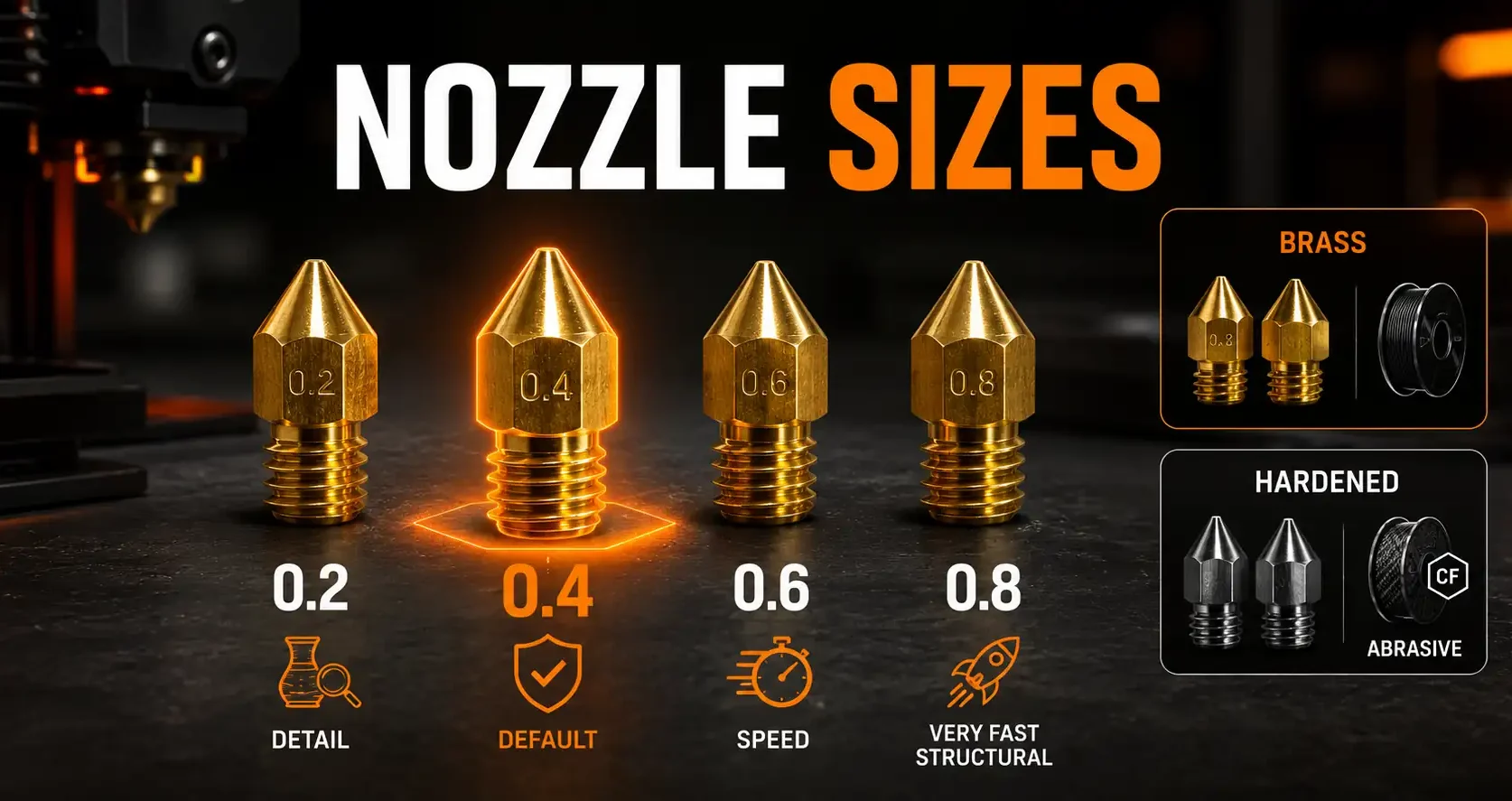
The nozzle diameter controls the width of the plastic line your printer deposits. A 0.4mm nozzle lays down a line approximately 0.4mm wide. A 0.2mm nozzle lays down a line 0.2mm wide. A 0.8mm nozzle lays down a line roughly 0.8mm wide.
This has a direct relationship to layer height. The general rule is that layer height should stay between 25% and 75% of the nozzle diameter for reliable layer adhesion. With a 0.4mm nozzle, that means practical layer heights from 0.10mm up to 0.30mm. Go outside that range and you either get layers that don’t bond properly (too thin) or poor surface quality from over-extrusion (too thick).
Nozzle diameter also determines how fast a printer can reasonably move. A wider nozzle deposits more plastic per millimeter of travel, which means fewer passes to fill the same area, which means faster print times on large jobs.
Every Common Nozzle Size Explained
| Nozzle Size | Best For | Layer Height Range | Speed | Material |
| 0.2mm | Maximum detail, jewelry, fine miniatures | 0.05mm to 0.15mm | Very slow | Brass (PLA only) |
| 0.4mm | Everything. The universal standard. | 0.10mm to 0.30mm | Standard | Brass or hardened |
| 0.6mm | Large functional parts, speed printing | 0.15mm to 0.45mm | Fast | Brass or hardened |
| 0.8mm | Structural parts, rapid prototyping, draft prints | 0.20mm to 0.60mm | Very fast | Brass or hardened |
| 1.0mm+ | Large scale structural printing, industry | 0.25mm to 0.75mm | Extremely fast | Hardened steel required |
0.4mm: Why It’s the Right Default
The 0.4mm nozzle is the industry standard because it sits at the intersection of detail, speed, and compatibility. It can print fine enough detail for most hobbyist and professional work, is fast enough for practical print times, and is the size all default slicer profiles are tuned for.
For OreKo models, the 0.4mm nozzle handles everything in the catalog well. Deck box bodies, logo caps at 0.08mm layer height, dollhouse miniature frames, balcony railings, mold box walls. All designed and tested on 0.4mm nozzles. If you never change your nozzle from the factory default, you are not missing out on anything for these types of prints.
When to stick with 0.4mm:
- Any print from the OreKo catalog
- Standard functional prints
- Multi-color AMS printing
- Any time you are using PLA, PETG, or TPU
- When you don’t have a specific reason to change
0.2mm: When Detail Matters More Than Time
A 0.2mm nozzle produces the finest surface quality available on a standard FDM printer. Lines are half the width of the 0.4mm standard, enabling layer heights as fine as 0.05mm for smooth surfaces and sharp fine detail.
The trade-off is significant. Print times roughly double compared to 0.4mm for equivalent layer quality. The smaller opening clogs more easily, especially with filaments that contain any particles. And at 0.2mm, any dimensional inconsistency in the filament or any slight moisture absorption shows up immediately as extrusion variation.
0.2mm works well for:
- Highly detailed miniature figures where surface smoothness is the priority
- Jewelry and wearable pieces viewed up close
- Prototype parts where surface finish is critical for client presentation
Avoid 0.2mm for:
- Abrasive filaments: they destroy the opening fast
- Flexible filaments (TPU): too prone to clogging at this diameter
- Large prints where the time penalty is impractical
- PETG, which strings more and clogs smaller nozzles faster
0.6mm and 0.8mm: Speed Over Detail
Larger nozzles deposit more plastic per second. A 0.6mm nozzle can print roughly 40% faster than 0.4mm for equivalent layer thickness. A 0.8mm nozzle can cut print time on large structural parts by 50% or more.
The quality trade-off is visible layer lines on curved surfaces and softer fine detail. For a large vase, plant pot, or structural bracket where appearance is secondary to function, that trade-off is acceptable. For a deck box logo cap or miniature window frame, it is not.
Use 0.6mm or 0.8mm for:
- Large functional prints where time matters more than aesthetics
- Draft prints and prototypes before a final quality print
- Infill-heavy structural parts
- Anything over 200mm in height where fine detail is not on the surface
The Most Important Nozzle Upgrade: Hardened Steel
Nozzle material matters as much as nozzle size for anyone printing abrasive filaments. Brass is the default material. It works perfectly with standard PLA, PETG, and ABS.
But brass is soft. Run carbon fiber-filled PLA, glow-in-the-dark, metal-fill, wood-fill, or ceramic-fill filaments through a brass nozzle and the abrasive particles sand the inside wider with every print. After a few hundred grams, a 0.4mm brass nozzle can widen to 0.5mm or more.
Filaments that require hardened steel:
- Carbon fiber-filled PLA, PETG, or PA (any CF filament)
- Glass fiber-filled filaments (GF)
- Glow-in-the-dark filaments
- Metal-fill (bronze fill, copper fill, iron fill)
- Wood-fill (cellulose particles are mildly abrasive over volume)
- Any filament marketed as composite or specialty
Hardened steel nozzles cost $10-25 each versus $2-5 for brass. Run a single 750g spool of CF-PLA through brass and you have consumed more in nozzle wear than a hardened steel replacement would have cost.
Nozzle Material Quick Reference
| Nozzle Material | Best For | Avoid With | Cost |
| Brass | PLA, PETG, ABS, TPU, standard filaments | CF, GF, glow, metal-fill, composite | $2-5 |
| Hardened Steel | All abrasive filaments. Also works for standard filaments. | Nothing, works with everything | $10-25 |
| Ruby-Tipped | Maximum longevity, heavy abrasive use | Nothing, the premium option | $50-100 |
| Stainless Steel | Food-safe applications, mildly abrasive filaments | Highly abrasive filaments (less durable than hardened) | $8-15 |
What OreKo Models Use
Every model in the OreKo catalog is designed and tested using a standard 0.4mm brass nozzle. The print settings on each product page assume a 0.4mm nozzle. All recommended layer heights (0.08mm for logo caps, 0.12mm for miniature details, 0.20mm for box bodies) are calibrated for 0.4mm.
If you are printing OreKo models, do not swap to a different nozzle size unless you have a specific reason. The 0.4mm is the validated configuration. A 0.6mm nozzle will produce visible quality degradation on fine detail pieces like mana chips and Jolly Roger caps. A 0.2mm nozzle will work but will significantly increase print time without proportional quality gains on most pieces.
When to Replace Your Nozzle
Brass nozzles do not last forever even on standard filaments. Signs that a nozzle needs replacing:
Inconsistent extrusion. Lines that vary in width, gaps in the surface, or under-extrusion that is not caused by temperature or speed settings often indicate a worn or partially clogged nozzle.
Stringing that can’t be tuned away. Progressive nozzle wear widens the opening slightly, changing the flow characteristics. If stringing suddenly gets worse on a filament you have printed cleanly before, check the nozzle.
Dimensional inaccuracy. If prints start coming out wider than expected, a worn brass nozzle from abrasive filament use is often the cause.
General rule: Replace brass nozzles every 3-6 months of regular printing, or immediately after a significant run of abrasive filament. Hardened steel nozzles can last years with proper care.
Where OreKo Sources Its Filament
Every OreKo model is tested with eSUN filaments before the file is published. Their PLA Basic and Matte PLA deliver the consistency needed for reliable settings documentation. Temperature, flow, and surface finish stay predictable spool to spool. That predictability is what lets us publish specific settings on each model page with confidence.
eSUN is one of the largest filament manufacturers in the world. Their full range including PLA, PLA+, Matte PLA, PETG, ABS+, TPU, silk, wood fill, and specialty filaments is available through the eSUN Official Store.
This post contains an affiliate link. If you purchase through it, we earn a small commission at no extra cost to you.