
Wet PLA is one of those 3D printing problems that sneaks up on you.
One week your prints look clean, smooth, and reliable. The next week, the same spool starts making weird popping sounds, the surface looks rough, the nozzle leaves wispy strings everywhere, and the finished part feels weaker than it should. It is easy to blame slicer settings, nozzle temperature, retraction, or even the printer itself.
Sometimes those things matter. But if the filament has absorbed moisture, drying it can be the fastest fix.
PLA does not absorb moisture as aggressively as nylon, TPU, PETG, or PVA, but it can still take on enough humidity to affect print quality. This is especially true if the spool has been sitting out for weeks, stored in a humid room, or used in a climate like South Florida where the air feels like it comes preloaded with water.
The good news: PLA is usually easy to recover. In many cases, a few hours of controlled heat is enough to bring the filament back to life.
Quick Answer: The Fastest Safe Way to Dry PLA
For most PLA filament, the safest fast method is:
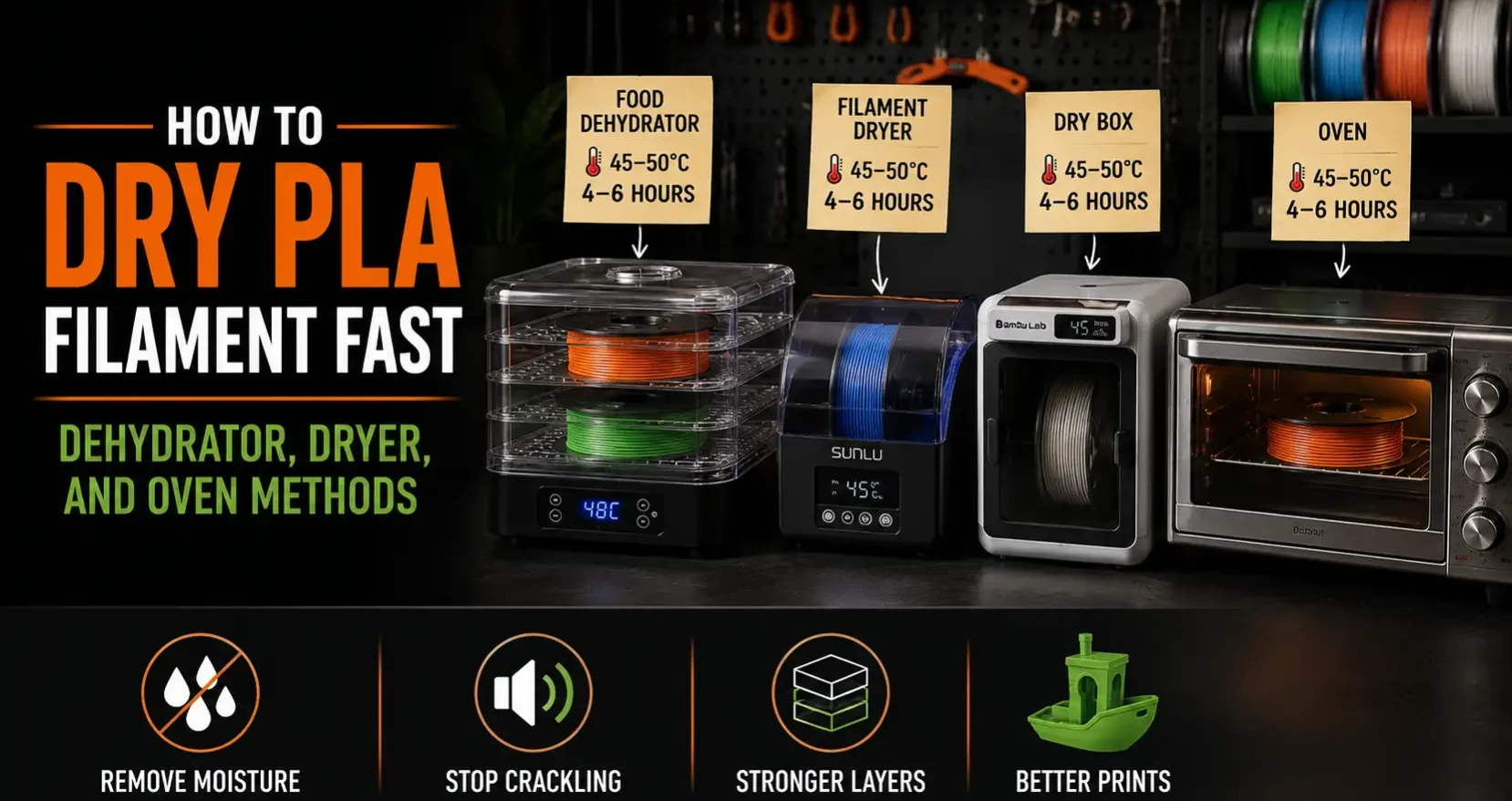
Dry PLA at 45–50°C for 4–6 hours in a food dehydrator or filament dryer.
If your filament manufacturer gives a specific drying recommendation, follow that first. Some PLA and PLA Pro blends can tolerate slightly higher drying temperatures, but generic PLA should be treated carefully. PLA softens at relatively low temperatures compared with many other 3D printing materials, so going too hot can warp the spool, deform the filament, or cause the filament loops to stick together.
A good rule of thumb:
| Method | Temperature | Time | Best For |
|---|---|---|---|
| Food dehydrator | 45–50°C | 4–6 hours | Fast, affordable drying |
| Filament dryer | 45–50°C | 4–6 hours | Regular printing and convenience |
| Dry box with desiccant | Room temp | Storage, not fast drying | Keeping dry filament dry |
| Oven | 45–50°C if accurate | 4–6 hours | Last resort only |
If you just need the practical answer: use a food dehydrator or a purpose-built filament dryer. Avoid the oven unless you can confirm the real internal temperature with a separate thermometer.
How to Tell If PLA Filament Is Wet
Wet filament does not always look wet. You will not usually see water droplets on the spool. The signs show up while printing.
Common symptoms include:
- Popping, crackling, or hissing sounds from the nozzle
- Rough or fuzzy surface texture
- More stringing than usual
- Tiny bubbles in the extruded filament
- Inconsistent extrusion
- Weak layer bonding
- Brittle or ugly-looking prints
- Random blobs or small pitted marks on the surface
The popping sound is one of the biggest clues. Moisture inside the filament flashes into steam as the filament passes through the hotend. That steam interrupts the flow of melted plastic and can leave bubbles, rough patches, and inconsistent extrusion behind.
Stringing can be caused by other things too, like nozzle temperature, retraction settings, travel speed, or slicer profile issues. But if a spool printed well before and suddenly starts acting messy after sitting out, moisture should be near the top of your troubleshooting list.
Sunlu FilaDryer S2, Bambu Lab dry box, and PolyDryer are filament-specific options. They set temperature precisely for filament use and some allow printing directly from the dryer while drying continues. More convenient than a food dehydrator for regular use. Time to dry PLA: same 4-6 hours at 45-50°C.
For a full breakdown of filament types and how to choose between them, see the filament guide.
Does PLA Really Need Drying?
Yes, sometimes.
PLA is often described as “not very hygroscopic,” which is mostly true compared with materials like nylon or TPU. But “less sensitive” does not mean “immune.” PLA can still absorb moisture over time, especially in humid environments.
You probably do not need to dry every brand-new PLA spool before every print. But drying is worth it when:
- The spool has been open for several weeks
- The spool was stored without a sealed bag or dry box
- You hear popping or sizzling during extrusion
- Prints suddenly look rough with the same slicer settings
- You live in a humid climate
- You are printing something large, detailed, or important
- You are using silk PLA, PLA+, matte PLA, or filled PLA that has been sitting out
For quick decorative prints, slightly damp PLA may still work. For clean surfaces, tight tolerances, smooth miniatures, or stronger functional parts, dry filament matters more.
Fastest Method: Food Dehydrator at 45–50°C
A food dehydrator is one of the best low-cost tools for drying PLA. It gives steady warm airflow, usually has better temperature control than a kitchen oven, and can often fit one or more spools depending on the model.
Set the dehydrator to 45–50°C and dry the PLA for 4–6 hours.
For a lightly damp spool, 4 hours may be enough. For a spool that has been sitting out in a humid room for months, 6 hours is a safer starting point. If the filament is still popping or printing rough afterward, run another drying cycle.
How to Dry PLA in a Food Dehydrator
- Remove the PLA spool from any bag or box.
- Place the spool inside the dehydrator.
- Set the temperature to 45–50°C.
- Run it for 4–6 hours.
- Let the spool cool slightly before handling.
- Print a small test object or extrude a short line.
- Listen for popping and check the surface finish.
A food dehydrator works especially well if you own multiple spools and want to dry them in batches. Some larger models can hold more than one spool at a time, which is useful before a big project or before the humid season hits.
Why a Dehydrator Works So Well
Drying filament is not only about heat. Air movement matters too.
A dehydrator warms the spool while circulating air around it. That moving air helps carry moisture away from the filament instead of trapping it in a warm box. For PLA, gentle heat and steady airflow are exactly what you want.
Food Dehydrator Pros
- Affordable compared with some filament dryers
- Good airflow
- Can fit multiple spools depending on model
- Simple to use
- Great for bulk drying
Food Dehydrator Cons
- May need tray modification to fit spools
- Not designed specifically for printing from the dryer
- Takes up counter or workshop space
- Some models have poor temperature accuracy
If you use a dehydrator often, it is worth checking the real internal temperature with a small thermometer. The dial on the front is not always perfect.
Purpose-Built Filament Dryers
Purpose-built filament dryers are the most convenient option for regular 3D printing. Models like the Sunlu FilaDryer series, Bambu Lab filament drying setups, and Polymaker PolyDryer-style systems are designed specifically for spools.
These dryers usually let you set the temperature by material type or manually choose the drying temperature. Many also allow the filament to feed directly from the dryer to the printer, which is useful during long prints.
For PLA, use 45–50°C for 4–6 hours unless the filament manufacturer recommends something different.
Why Choose a Filament Dryer?
A filament dryer makes sense if you print often, keep several spools open, or live somewhere humid. Instead of treating drying like an emergency fix, you can make it part of your normal printing routine.
For example, if you are starting a long print on a spool that has been sitting out for a few weeks, you can place it in the dryer before printing. Some dryers let you keep the spool warm and dry while the printer pulls filament from it.
That is especially helpful for overnight prints. Nobody wants to wake up to a 10-hour print covered in stringing because the filament was damp.
Filament Dryer Pros
- Built for 3D printing spools
- Easy temperature controls
- Can often print directly from the dryer
- More compact than many dehydrators
- Good for daily or weekly use
Filament Dryer Cons
- Usually dries fewer spools at once
- Some models have uneven heating
- Small dryers may not fit oversized spools
- More expensive than DIY storage boxes
A filament dryer is not magic. It still needs enough time to work. If your PLA is wet, running it for 30 minutes before a print probably will not fully fix it. Give it a real drying cycle.
Can You Dry PLA in the Oven?
Yes, but it is the riskiest method.
A kitchen oven seems like the obvious solution because most people already have one. The problem is that home ovens are not designed for precise low-temperature control. They often overshoot, cycle unevenly, or have hot spots. That might not matter when baking food, but it can ruin PLA.
PLA can soften, warp, or stick together if the temperature gets too high. Even if you set the oven to 50°C, the actual temperature inside may swing higher than the display suggests.
If You Must Use an Oven
Only use an oven if you can verify the real temperature.
- Place an external oven thermometer inside.
- Preheat the oven and let it stabilize.
- Confirm the temperature stays around 45–50°C.
- Place the spool on a clean tray.
- Dry for 4–6 hours.
- Do not let the spool touch a heating element or hot metal wall.
- Check the spool occasionally.
Do not guess. Do not use high heat for a shorter time. Do not assume the oven display is accurate.
A slightly damp spool is annoying. A melted spool is worse.
What About an Air Fryer?
Usually, no.
Air fryers are great at moving hot air, but many do not hold low temperatures accurately enough for PLA. They are also small, intense, and more likely to create hot spots. Unless your air fryer has a reliable low-temperature dehydrator mode and enough room for the spool to sit safely, skip it.
A food dehydrator or filament dryer is a much better choice.
What About a Dry Box?
A dry box is excellent for storage, but it is not the fastest way to dry wet filament.
This is a common point of confusion. A sealed box with silica gel can help keep dry filament dry. It can also slowly pull some moisture from the air around the spool. But if the filament has already absorbed moisture, room-temperature desiccant storage is much slower than active heated drying.
Think of it like this:
Dryer = removes moisture from the filament.
Dry box = prevents the filament from getting wet again.
The best setup is to use both. Dry the spool first, then store it in a sealed container with fresh desiccant.
Best PLA Drying Workflow
For the most reliable results, use this routine:
- Dry the PLA at 45–50°C for 4–6 hours.
- Print a small test to confirm the popping and rough texture are gone.
- Store the spool immediately in an airtight bag, cereal box, gasket container, or dry box.
- Add desiccant to the container.
- Recharge or replace desiccant when the color indicator shows it is saturated.
- Redry the spool if print quality drops again.
This routine is especially useful if you rotate between many colors. Every time a spool sits open, it has more time to absorb humidity.
How Long Should You Dry PLA?
Most PLA spools respond well to 4–6 hours.
Use the lower end when:
- The spool is only slightly damp
- It has been open for a short time
- You caught the symptoms early
- You are using a reliable dryer with good airflow
Use the higher end when:
- The spool has been open for months
- You live in a humid area
- You hear loud popping from the nozzle
- The print surface looks rough or foamy
- You are drying silk, matte, or specialty PLA
If the spool is still causing issues after 6 hours, dry it longer at the same safe temperature instead of increasing the heat too much.
Can You Overdry PLA?
At normal PLA drying temperatures, overdrying is usually less of a concern than overheating. The bigger danger is drying too hot, not drying too long.
That said, you do not need to cook PLA forever. Once the spool prints cleanly again, move it to sealed storage. Running a dryer all day for no reason wastes energy and may expose the spool to unnecessary heat.
A practical routine is better than an extreme one.
What Temperature Is Too Hot for PLA?
For generic PLA, be careful above 50–55°C unless the manufacturer specifically recommends it.
PLA has a relatively low softening range compared with materials like PETG, ABS, ASA, or nylon. If the filament gets too warm, the spool can deform, the filament can ovalize, or the loops can fuse together. Once that happens, the filament may jam or feed inconsistently.
This is why “just turn it up hotter” is bad advice for PLA.
Stick with controlled heat. Give the moisture time to leave.
Should You Dry Brand-New PLA?
Sometimes.
New filament usually arrives sealed with desiccant, but that does not guarantee it is perfectly dry. A spool can absorb moisture during manufacturing, packaging, shipping, warehouse storage, or after the vacuum seal fails. Some filaments also seem to arrive more moisture-sensitive than others.
You probably do not need to dry every new PLA spool automatically. But for important prints, it can be worth drying first, especially if:
- The vacuum bag was loose
- The desiccant packet looks saturated
- The spool came from a humid storage area
- You are printing a large part
- You are using expensive or specialty PLA
- You need a clean cosmetic finish
When in doubt, drying PLA is usually faster than wasting a long print.
Storage After Drying
Drying filament only solves half the problem. If you dry a spool and then leave it sitting open on the shelf, it will slowly start absorbing moisture again.
Good storage options include:
- Vacuum bags with desiccant
- Airtight cereal containers
- Plastic storage bins with gasket lids
- Dedicated filament dry boxes
- Reusable spool bags
- AMS-compatible dry storage setups
- Sealed bins with rechargeable silica gel
For humid climates, sealed storage matters a lot. A spool that stays usable for months in a dry room may start acting up much faster in a garage, shed, or open-air workshop near the coast.
If you print in South Florida, the Gulf Coast, the Caribbean, or any humid region, assume filament storage is part of your print quality system.
Simple Test After Drying
After drying, do not immediately start a 14-hour print. Run a quick test first.
A good test can be:
- A small Benchy
- A temperature tower
- A stringing test
- A simple calibration cube
- A short manual extrusion through the nozzle
You are looking for three things:
- No popping or hissing
- Smoother extrusion
- Less stringing and roughness
If the same spool, same printer, and same slicer profile suddenly print better after drying, moisture was likely the problem.
Common Mistakes When Drying PLA
Mistake 1: Using Too Much Heat
This is the big one. High heat can permanently damage PLA. Dry longer at a safe temperature instead of hotter for less time.
Mistake 2: Trusting the Oven Display
Home ovens can swing above the set temperature. Always verify with a separate thermometer if you use an oven.
Mistake 3: Thinking Desiccant Alone Is Fast
Desiccant is great for storage. It is not a fast rescue method for a wet spool.
Mistake 4: Drying the Spool, Then Leaving It Out
Once the filament is dry, seal it up. Otherwise, you are resetting the clock.
Mistake 5: Blaming Moisture for Everything
Wet filament causes plenty of problems, but not every stringing issue is moisture. If drying does not help, check nozzle temperature, retraction, flow rate, cooling, and filament path.
Best Method Overall
For most makers, the best PLA drying setup is simple:
Use a food dehydrator if you want the best low-cost drying option.
Use a filament dryer if you want the most convenient printing workflow.
Use a dry box after drying to keep the spool ready.
Use an oven only as a last resort.
If you print occasionally, a food dehydrator and sealed storage bags may be all you need. If you print every week, a filament dryer is worth having near the printer. If you live in a humid climate, dry storage should not be optional.
Final Recommendation
The fastest safe way to dry PLA is to use controlled heat at 45–50°C for 4–6 hours. A food dehydrator is affordable and effective. A filament dryer is more convenient for regular use. An oven can work, but only if you verify the real temperature and keep it stable.
Wet PLA can make a good printer look badly tuned. Before you spend an hour chasing retraction settings or blaming the slicer, dry the spool and test again.
Sometimes the fix is not a new nozzle, a new profile, or a full calibration session.
Sometimes your filament just needs a warm, dry timeout.
Where OreKo Sources Its Filament
Every OreKo model is tested with eSUN filaments before the file is published. Their PLA Basic and Matte PLA deliver the consistency we need for reliable settings documentation — temperature, flow, and surface finish stay predictable spool to spool. That predictability is what lets us publish specific settings on each model page with confidence.
eSUN is one of the largest filament manufacturers in the world. Their full range — PLA, PLA+, Matte PLA, PETG, ABS+, TPU, silk, wood fill, and specialty filaments — is available through the eSUN Official Store.
Disclosure: the eSUN link above is an affiliate link. If you purchase through it, we earn a small commission at no cost to you. We only recommend products we use ourselves.